• This section is for help and assistance with 2018 and NEWER Buick Regals. If you need assistance with a 2011-2017 Buick Regal, CLICK HERE. If you need assistance with a 2010 or older Buick Regal, CLICK HERE. This notice may be dismissed by clicking the X in the right corner.
  • Car enthusiast? Join us on Cars Connected! iOS | Android | Desktop

SD Card Error, now USB not working

This has happened intermittently on my '19 as well. Usual symptoms are "SD card error" and the USB ports stop working. I have one of the cheap USB nav cards as well (p/n 8681 0236)

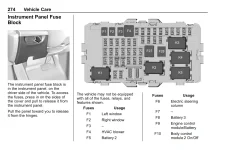
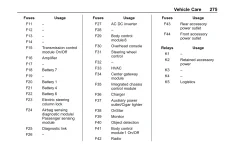
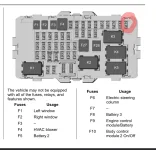
A reset of the HMI usually fixes it. See page 267 in the manual. Access the interior fuse panel to the left of the steering wheel, behind the headlight/fog light controls. Pull fuse F42 wait a few seconds and plug back in.

This reboots the HMI and resolves whatever glitch is causing this.
 

Attachments

  • Screenshot_20250912_221517_Firefox.webp
    Screenshot_20250912_221517_Firefox.webp
    60.5 KB · Views: 5
I've looked at a couple threads and through the fuse guide. Does anyone know what fuse the USB ports in the center console are tied to? I have full head unit/infotainment functionality but no data or power at the USB ports (tested with a voltmeter.) I just picked up a 2018 TourX Essence and based on some staining around the USB ports I'm guessing that some coffee got spilled. I get the SD card error in the infotainment as well. I haven't tested with a voltmeter but with a 12V/cigarette port charger in the front bin isn't getting current either, do they share a fuse?

I'll edit this post in a bit but I'm almost positive I have the combo SD Card + 2 USB port part (GM 84789791) that's referenced in this thread but for whatever reason it's not listed as compatible with 2018 or 2019 model years, I'm just noting for others that might come across this thread.
 
If I have to guess, it would be F44 for the front USB and F43 for the rear USB port. Reason is that F37 clearly states it is the cigar lighter.
1765227010134.webp
1765226930705.webp
 
If I have to guess, it would be F44 for the front USB and F43 for the rear USB port. Reason is that F37 clearly states it is the cigar lighter.
View attachment 49763
View attachment 49762
Thanks for this! I was able to source the dual USB (no SD card) center console part and install it, initially I didn't get CarPlay to connect but was getting USB power vs. no power before. After completely reinstalling the center console and going for a drive CarPlay connected and works great. I ordered the dual USB with SD card to get back to factory.

My 12V wasn't getting power because it was disconnected from behind, my initial assumption that the 12V and the USB were fused together is not correct. It looks like someone had my center console apart to fix something at some point and overlooked this connection during reassembly.

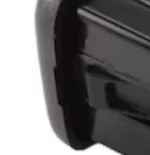
For those that come across this thread with a similar issue - you do not need to remove the entire center console to replace the center console (glovebox) USB. There are tabs on the left and right of the part and you can wedge a shim in on each side to depress that catch - reference image attached. My wires were pinched underneath so I would've needed to remove the console anyway but it could've been easier.

There was a lot of fussing with CarPlay it was initializing then stalled then started again. There was another thread where someone posted that their CarPlay only worked after 45 seconds of forward driving. I was able to get it to fully connect once I put it in drive with the full console reassembled I hope that's not the standard moving forward but the 20 hr drive with bluetooth and all of the issues wasn't acceptable long term.
 

Attachments

  • Screenshot 2025-12-09 at 12.17.19.webp
    Screenshot 2025-12-09 at 12.17.19.webp
    1.5 KB · Views: 1
______________________________

Help support this site so it can continue supporting you!
Back
Top