• This section is for help and assistance with 2018 and NEWER Buick Regals. If you need assistance with a 2011-2017 Buick Regal, CLICK HERE. If you need assistance with a 2010 or older Buick Regal, CLICK HERE. This notice may be dismissed by clicking the X in the right corner.
  • Car enthusiast? Join us on Cars Connected! iOS | Android | Desktop

Infotainment Display Buick to Opel

voodoosoul

Member
Joined
May 26, 2019
Messages
49
Reaction score
17
Points
8
Buick Ownership
tour x
Has anyone changed their display that shows Buick on the screen when you turn on the car to Opel, is there a setting or can the dealer change it?
 
Pretty sure you would have better chance of getting that done at your local Opel dealer.
 
It would be a European calibration of the radio, I assume.
Then you would lose something else in the radio as their frequencies are not the same as here.
On top of that, you would also lose the satellite radio. But you should gain RDS.
 
From the limited research I've done--changing the splash/flash screens on the infotainment system doesn't require reprogramming the entire unit--just replacing the jpg/png image files. The newer (2018.5 & up) units made by Samsung are (or should be) accessible with Android's ADB software and a USB bridge cable & how to enable the developer mode has already been discussed on this forum. The previous HMI units (NGI 2.5 with the Bosch software) are more difficult to access. There is also this fellow:

~Vendor Coastal Flash~ - HMI, Cluster, Radio, Reverse Engineering, Upgrades

Who seems to have very good progress in this field.
 
______________________________

Help support this site so it can continue supporting you!
I lurk more than I post on the forum, but Anaduff's tag ("2019 Insignia with a Buick radio") compelled me to update this thread with a bit more info.

Going in order, the answer to the OP's post is: no, there is not a setting that one can simply select to change the startup splash screen from Buick to Opel (or whatever); and no, your dealer cannot make this change for you. (Posts 2 and 3 in the thread above are just ill-informed guesses and can be ignored.)

Anaduff's post gets to the heart of the matter and has some good solid info in it:
  • There are two basic types of head units in the Insignia/Regal: before and after what Anaduff calls the 2018.5 mark, call 'em "Early" and "Late".
  • The fundamental difference between the two is that the Early unit has a different operating system than the Late unit.

The Early unit has an operating system, or OS, called QNX. You can Google it if you like, but to summarize, it's a common OS for embedded systems and was the basis for GM's "infotainment" (hate that word) units for many years. It's a proprietary system and, fun fact, is currently owned by the Blackberry people.

There's plenty of info on hacking QNX-based systems online, but if you're a hacker you already know this... and in any case I don't care since I have a Late unit in my Insignia/Regal.

The Late unit is far more interesting. It's based on the Android operating system, and like Anaduff said, that means it can be accessed using the tools used for working with other Android devices. So I did. More in the next post.
 
Last edited:
But first a side note.

You may be thinking, "my car has Android Auto, does that mean it is a Late (Android OS) unit?" The answer is no, not necessarily. Android Auto is simply an app, and it can run on whatever operating system. Think of the Google Chrome web browser: you can run it on a Windows computer or an Apple computer, but it's just program. Same with Android Auto: it's just a program that allows your Android phone to communicate with whatever system is on your car.

You may also be asking yourself how to tell whether you have an Early or Late system. I believe the easiest way to tell is by looking at the layout and icons on the screen; there's more info on this forum in various threads, and IIRC some photos to help you tell them apart.

Now, back to the Late units, and the Android OS.
 
Anaduff was completely correct when he speculated that the head unit should be accessible with Android Debug Bridge (ADB) via the USB. I did this yesterday and had a look around at the system.

Sticking with the original topic of the thread, I'm going to assume that we're mainly interested in the Opelisierung of our Regals' startup screens, and not in more in-depth types of Android programming, such as writing special apps for the car, or fundamentally changing the way the infotainment system operates. For the former, you can download the handy Android SDK that GM has published; for the latter, well, not a lot of serious hackers on this board. Age profile's all wrong. 🙂

What I found in poking through my car's systems is good news and bad news for those looking to have their car flash a lightning logo at startup.

First, I wanted to learn how Android handles the startup splash screen in a typical installation before jumping into the car. As it happens, I had a typical installation in my pocket: my couple-years-old Android-based phone. So I set about changing the startup splash screen animation in the phone.

This proved to be pretty easy: suffice it to say that it's a well-trod path, and there are some very good tools out there to get access to, and make changes to, Android phone systems. It was basically a three-step process: one, hijack the boot process so that I could install some software to get around the access restrictions built into the system; two, install that software; and three, log into my phone at the OS level and paste in some new picture files.

So I had proved the concept in no time at all, and now I had a phone that had a new startup animation... with an Opel logo, natch. Now to the passenger seat with the laptop.

Logging into the car's system using Android's USB debugging feature was simplicity itself, once USB debugging was enabled on the dash screen and ADB was running on my laptop. (No password is needed for looky-loo access.) So that's the good news: you'll be able to change those startup spash screens from the passenger seat, no need to disassemble your dashboard and mail your radio to somebody.

But it was plain from just a few minutes of poking through the system that the layout and location of various files and folders was somewhat different than on my phone. I wasn't even able to find the startup animation files, for instance, despite looking in the typical places. So it may be the case that those animation image files are hidden from the basic-access user.

And of course to change those animation files, I would need to do the three-step process I did on my phone. In other words, I would need to bypass the access restrictions in the car's infotainment system's OS so that I would have full read-write access. And in order to do that, I would need to hijack the system's boot process and insert new code. So that's the bad news for those who want a press-a-button way to make their dashboard say "Opel": the only open path is to get into the nitty-gritty of the OS, which is probably not a safe option for the average Regal ranger.

So.... that's where I stopped for the day.
 
Last edited:
I wasn't even able to find the startup animation files, for instance, despite looking in the typical places.

And of course to change those animation files, I would need to do the three-step process I did on my phone. In other words, I would need to bypass the access restrictions in the car's infotainment system's OS so that I would have full read-write access. And in order to do that, I would need to hijack the system's boot process and insert new code.

So.... that's where I stopped for the day.

I've been in the Android world since the Nexus One (which I still have, and still works!) which I changed over to CyanogenMod way back in the day. Older versions of Android didn't have the same format for the boot animation, but later versions (I think starting with 5.0 Lollipop) added a folder so that cellular carriers could insert their own boot animations. If you had access to the files, you could insert whatever pictures/animations you wanted. Or as the case with my Nexus 6 that I bought through AT&T, I just deleted them altogether.

The biggest factor with phones was that there was already a larger group of dedicated folks who'd already figured out how to unlock bootloaders for various devices for those who wanted full root control, and I don't know who may have done that with this particular car's infotainment system. I have no skill in writing such a thing, either, but until someone's developed the utilities to do it, I don't think most of us on the user end will be able to unlock the bootloader in order to change files.
 
______________________________

Help support this site so it can continue supporting you!
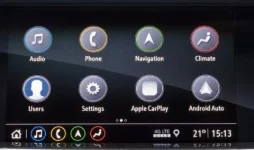
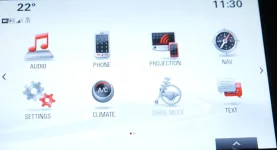
I'm wondering, if we could find a kernel build for opel and extract some files and folders from it. Looks like the older version of Opel's"infotament" system is totally different from Buick's. But, the new ones looks similar, thus people with new gen head unit will have good chances of getting Regals Opelised.
New
1578090147402.png
vs
Old
1578090364485.webp
 

Attachments

  • 1578090269696.webp
    1578090269696.webp
    21.7 KB · Views: 7
I'm wondering, if we could find a kernel build for opel and extract some files and folders from it. Looks like the older version of Opel's"infotament" system is totally different from Buick's. But, the new ones looks similar, thus people with new gen head unit will have good chances of getting Regals Opelised.
New
View attachment 20411
vs
Old
View attachment 20413
One thing I noticed, the newer UI has a different font comparing to ours. That font is very similar to when changing our language to French.
 
I'm wondering, if we could find a kernel build for opel and extract some files and folders from it. Looks like the older version of Opel's"infotament" system is totally different from Buick's. But, the new ones looks similar, thus people with new gen head unit will have good chances of getting Regals Opelised.
New
View attachment 20411
vs
Old
View attachment 20413
The old one is similar in layout to the red needle display.
 
Yup, but color scheme,icons and functions are different.
Well, I don't have "drive mode" but I have all the rest. Different Colors and icons, but the point is that it looks like it COULD control my current system.
 
Well, I don't have "drive mode" but I have all the rest. Different Colors and icons, but the point is that it looks like it COULD control my current system.
You are probably right mate. Only one way to figure this out is to flash it to our head units.
 
You are probably right mate. Only one way to figure this out is to flash it to our head units.
Then you lose the FM radio, since EU uses different frequencies. 😱
 
Then you lose the FM radio, since EU uses different frequencies. 😱
True that. Also we don't know, how car would react on different suspension and missing 360 cameras and other hardware...
 
______________________________

Help support this site so it can continue supporting you!
Then you lose the FM radio, since EU uses different frequencies. 😱
Actually, the European & UK FM bands are substantially the same as those in the USA. There was an issue (poor FM reception) with the Jaguar (S-Type & X-Type) radios in the US, and the solution was to put the radio into set-up mode and change it from US to the European standard which has a side effect of increasing the gain of the FM receiver. Side effect was you lost the AM band, but replaced it with 2 'new' bands; MW (medium-wave) and LW (long-wave). Upshot being, for the last 17 years, I've had no FM reception issues with that set-up (or with the 2 new AM bands for that matter).

That said, I haven't seen any Euro-spec HMI boxes to know if they are plug compatible with the US 'Infotainment 3' (Samsung) boxes--but if anyone wants to try, please keep the forum in the loop!

 
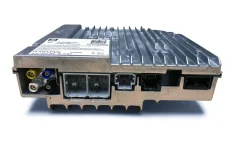
Just in case anyone from Europe (or Area 51--I understand they like the white needle cars😉) wants to comment, the HMI module we have in the US looks like this...

HMI (IOS)1.JPG
 
Last edited:
Actually, the European & UK FM bands are substantially the same as those in the USA. There was an issue (poor FM reception) with the Jaguar (S-Type & X-Type) radios in the US, and the solution was to put the radio into set-up mode and change it from US to the European standard which has a side effect of increasing the gain of the FM receiver. Side effect was you lost the AM band, but replaced it with 2 'new' bands; MW (medium-wave) and LW (long-wave). Upshot being, for the last 17 years, I've had no FM reception issues with that set-up (or with the 2 new AM bands for that matter).

That said, I haven't seen any Euro-spec HMI boxes to know if they are plug compatible with the US 'Infotainment 3' (Samsung) boxes--but if anyone wants to try, please keep the forum in the loop!

That is very strange. 😵
My work experience with the European radios got me that concept of different frequencies.
One thing for sure is that they have DAB and do not have XM. So that yellow antenna on the module will not be connecting to anything.
 
That's true--they have (or are going to have) DAB, the US has HD radio--and no XM over there. Wonder it the Euro units have that yellow XM connector just because it's easier to produce a single piece of hardware--just like I have the blue connector, but I don't have navigation (although NAV will show-up in the 'running apps' for about 30 seconds just after you start the car). General FYI--the white & black connectors are the AM/FM antenna connexions.
 
Back
Top