Uniqez
Well-known member
- Joined
- Jul 31, 2019
- Messages
- 684
- Reaction score
- 349
- Points
- 63
- Buick Ownership
- 2018 Opel Insignia Country Tourer with nothing left of Buick
The car lovers social network
High Performance for your Buick
Create videos that captivate
Automotive Hot or Not
Vehicle hacker protection
Buick parts & accessories
Advertise with us!
The car lovers social network
High Performance for your Buick
Create videos that captivate
Automotive Hot or Not
Vehicle hacker protection
Buick parts & accessories
Advertise with us!


Do you need to have HMI connected to it as well, to be able communicate? So you can see what is going on with the module?The inside (hardware) story.
[/URL]
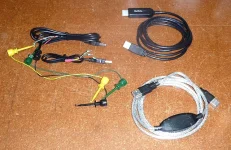
I've tried several USB bridge cables, two different computer (tower w/ Linux Mint & laptop with Windows 7) & a couple of different ADB configurations to talk to the INFO 3 module--I would have had the same success rate if I had used a manual typewriter and a garden hose. I would have to say the software gods smiled upon 'Blitzschnell' during his probing session (either that, or I needed to sacrifice an 8" floppy disc on the grill to get their attention). Was looking forward to seeing the results of: adb shell find / -name *.png -fprint <file name> to see where & what the image were located/contained.
On the plus side; I have heard from White Auto & Media that they have made progress working with Harman to get into the system so maybe soon...
 github.com
Much prefer the Opel system. Drove one not long ago when I was over there. If we could covert it over it would sure be cool! And make it feel even more so unique
I was digging through the code to see, if I can spot at least reference for make or model. If you have model 1, you would use this logic and so on.At the risk of repeating myself: digging through the provided source code files is not going to give anything useful with regard to changing the splash screens-- or anything else-- on the head units. Those files are OS components that Harman reused under public license; they will not include the (wholly proprietary) items Harman built on top of the OS, such as the animation engine... and still less would they include picture files containing trademarked logos.
It seems some folks are having trouble connecting to the Android head unit to poke around. I've done it many times and have had no trouble; perhaps it's simpler than it sounds? In any case, here's the how-to:
1) Download the SDK Tools zip from the Android developer site. (Search "download ADB" in Google.) Extract it to a folder on your PC.
2) Start Powershell in that folder and type ".\adb devices". You should get a message showing an empty list of devices, if adb is working.
3) Go sit in the passenger seat of your car. Turn it on (ignition only, no need for the engine to be running) and wait for the radio to boot up.
4) In the head unit, go to Settings->System and activate USB debugging. You need to do this each time the radio's been power cycled.
5) Plug your USB data cable to the car and to the laptop. Wait until your laptop makes its "new device" ding, and then type ".\adb devices" again. You should see a list of devices with one gobbledygook number in it. That's your car's head unit computer.
I have found that, while I can shell into the head unit and interact with it like a typical posix machine, without root privileges access is quite limited indeed. Perhaps someone else will find something I have overlooked.
Good luck!

 forum.xda-developers.com
This thread seems to detail the process (and image parameters) fairly well:
[snip link]
(With credit to Uniqez.)
there must be something like the [old] MS-DOS 'config.sys' file that contains the 'BootLogo=Buick.PNG' or some similar 'on startup, do' command.