• This section is for help and assistance with 2018 and NEWER Buick Regals. If you need assistance with a 2011-2017 Buick Regal, CLICK HERE. If you need assistance with a 2010 or older Buick Regal, CLICK HERE. This notice may be dismissed by clicking the X in the right corner.
  • Car enthusiast? Join us on Cars Connected! iOS | Android | Desktop

Infotainment Display Buick to Opel

If you're interested in "reflashing" a QNX-based unit, you may want to read this article from a couple of months ago. The exploit the writer developed may no longer be available, as the article notes, but it does give you a sense of how these systems are structured (and what it takes to crack a proprietary embedded system). Good luck.

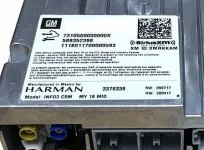
(NB: Although it's a different marque that the head unit in question goes into, it's the same unit manufacturer, as you can see if you squint at the label in Anaduff's photo above.)
 
Since I've reached a point in my life where curiosity outweighs vanity (👓), I wouldn't want to make it harder than it should be, so NO SQUINTING!
HMI (IOS)2.webp

The above is an IOS version of the HMI module similar to the one in my car, but mine shows a part number of 84604825 with SW: 280618 / HW: 180717 and a MY 18. These units are used across the GM line so that may explain the part number differences.
 
I lurk more than I post on the forum, but Anaduff's tag ("2019 Insignia with a Buick radio") compelled me to update this thread with a bit more info.

Going in order, the answer to the OP's post is: no, there is not a setting that one can simply select to change the startup splash screen from Buick to Opel (or whatever); and no, your dealer cannot make this change for you. (Posts 2 and 3 in the thread above are just ill-informed guesses and can be ignored.)

Anaduff's post gets to the heart of the matter and has some good solid info in it:
  • There are two basic types of head units in the Insignia/Regal: before and after what Anaduff calls the 2018.5 mark, call 'em "Early" and "Late".
  • The fundamental difference between the two is that the Early unit has a different operating system than the Late unit.

The Early unit has an operating system, or OS, called QNX. You can Google it if you like, but to summarize, it's a common OS for embedded systems and was the basis for GM's "infotainment" (hate that word) units for many years. It's a proprietary system and, fun fact, is currently owned by the Blackberry people.

There's plenty of info on hacking QNX-based systems online, but if you're a hacker you already know this... and in any case I don't care since I have a Late unit in my Insignia/Regal.

The Late unit is far more interesting. It's based on the Android operating system, and like Anaduff said, that means it can be accessed using the tools used for working with other Android devices. So I did. More in the next post.
Guessing since you seemingly referenced my post you thought I was being serious.
You should have known I was kidding about having your local Opel dealer help with this issue, since Opel dealers have not been available in the US for close to 50 years or so.
If you find a local Buick/Opel dealer please let me know, because I would be very interested in buying a NOS Opel GT and will be willing to pay MSRP for one.
 
I lurk more than I post on the forum, but Anaduff's tag ("2019 Insignia with a Buick radio") compelled me to update this thread with a bit more info.

Going in order, the answer to the OP's post is: no, there is not a setting that one can simply select to change the startup splash screen from Buick to Opel (or whatever); and no, your dealer cannot make this change for you. (Posts 2 and 3 in the thread above are just ill-informed guesses and can be ignored.)

Anaduff's post gets to the heart of the matter and has some good solid info in it:
  • There are two basic types of head units in the Insignia/Regal: before and after what Anaduff calls the 2018.5 mark, call 'em "Early" and "Late".
  • The fundamental difference between the two is that the Early unit has a different operating system than the Late unit.

The Early unit has an operating system, or OS, called QNX. You can Google it if you like, but to summarize, it's a common OS for embedded systems and was the basis for GM's "infotainment" (hate that word) units for many years. It's a proprietary system and, fun fact, is currently owned by the Blackberry people.

There's plenty of info on hacking QNX-based systems online, but if you're a hacker you already know this... and in any case I don't care since I have a Late unit in my Insignia/Regal.

The Late unit is far more interesting. It's based on the Android operating system, and like Anaduff said, that means it can be accessed using the tools used for working with other Android devices. So I did. More in the next post.
Guessing since you seemingly referenced my post you thought I was being serious.
You should have known I was kidding about having your local Opel dealer help with this issue, since Opel dealers have not been available in the US for close to 50 years or so.
If you find a local Buick/Opel dealer please let me know, because I would be very interested in buying a NOS Opel GT and will be willing to pay MSRP for one.
Guessing since you seemingly referenced my post you thought I was being serious.
You should have known I was kidding about having your local Opel dealer help with this issue, since Opel dealers have not been available in the US for close to 50 years or so.
If you find a local Buick/Opel dealer please let me know, because I would be very interested in buying a NOS Opel GT and will be willing to pay MSRP for one.
Still talking to myself.... I would even be interested in a NOS Opel Kadett Rallye.
 
______________________________

Help support this site so it can continue supporting you!
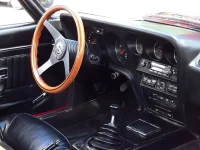
In the 70's (plus or minus 20 years) it was SO MUCH simpler to re-brand an infotainment system; in the case of the '70 Opel GT, I'm thinking maybe Grundig or perhaps Blaupunkt...

OpelGTInfotainment.webp
 
A couple more quick notes:

The "Late" system runs Android Lollipop:

[ro.build.version.release]: [5.1.1]
[ro.build.version.sdk]: [22]
[ro.build.version.security_patch]: [2016-05-01]


and is indeed built by Harman:

[ro.product.manufacturer]: [harman]
[ro.product.model]: [gminfo3]


I also found some clues as to how the unit handles the splash screens: it seems to carry a set of them, and to choose which one to display based on an environment variable. That may mean that the Opel (and Vauxhall and so on) animations are available in every install. There's still the matter of getting root access, however, and I have no news on that front.
 
It would sure be nice if all the needed graphics/animations were on-board, but I suspect (based on a total absence of any real knowledge) that the HMI units for North America would have Chev/GMC/Buick/Caddy graphics* only & the Euro units would have Opel/Vauxhall (not sure where the Holden's would be). Likewise the brand graphics for the instrument clusters (if they don't source from the HMI--suppose you could unplug the HMI & see if the cluster DIC goes blank). Still should be able (assuming R/W rights on the HMI) to 'push' a replacement image file with an identical filename into the HMI directory. Would still need to get the parameters for the existing Buick graphics so the new graphic images could be made to the correct size & format.

*remember seeing on another forum someone complaining about different GM brands showing-up on their info screens--probably NG 2.0 or 2.5 units--think the problem turned out to be a bad voltage regulator.
 
It would sure be nice if all the needed graphics/animations were on-board, but I suspect (based on a total absence of any real knowledge) that the HMI units for North America would have Chev/GMC/Buick/Caddy graphics* only & the Euro units would have Opel/Vauxhall (not sure where the Holden's would be). Likewise the brand graphics for the instrument clusters (if they don't source from the HMI--suppose you could unplug the HMI & see if the cluster DIC goes blank). Still should be able (assuming R/W rights on the HMI) to 'push' a replacement image file with an identical filename into the HMI directory. Would still need to get the parameters for the existing Buick graphics so the new graphic images could be made to the correct size & format.

*remember seeing on another forum someone complaining about different GM brands showing-up on their info screens--probably NG 2.0 or 2.5 units--think the problem turned out to be a bad voltage regulator.
I dunno... it would seem that info screens take up very little hard drive space. It would probably be easier and cheaper in the long run to write one software that encompasses all scenarios and then to let the computer decide which one to use based on the environment.
 
______________________________

Help support this site so it can continue supporting you!
You're right!

Best example (that I've found) is the Bosch* repository for their open source code:

I've downloaded one of their newer versions & rummaged around looking for images--none found. So the assumption is that while the code (99.9% of what's needed) is the same across the GM line, each brand (GMC, Buick &c.) has the ability to insert their own graphics--both start-up flash & the individual 'button' (OnStar/Music/Nav &c.) graphics to make their brand unique. So, as you thought, on initial start-up, the software says to 'display /GM/graphics/start[x].pcx' and it has no idea what will be seen by the driver (x being a code [1=chev, 2=GMC &c.] ).

Somewhere out there (Github/Android repository...) there should be the software for the Harman units, but 'open source' doesn't always mean 'easy access'.

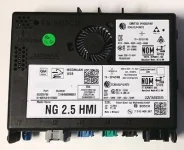
* The Bosch HMI (2017-2018.5) looks like this:
NG2.5HMI.webp
 
Based on the few files that I've stepped through, the system appears to be configured to run background processes ("services" in the jargon) for the instrument cluster. That may indicate that the Android head unit also runs the little screen between the dials, and thus controls the animations there as well.

There are a number of extraneous media files included in the build -- sound effects for things like camera clicks, for example -- and with >15GB of free space remaining after the factory install, I don't think including a full spread of animations would have been a tough choice for the manufacturer. But there's no point in speculating, really, as that is a later bridge to cross: access first.
 
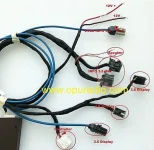
Excellent (drums fingertips together)! I was wondering how much of the instrument cluster graphics where native to the cluster. I would be nice (er, cheaper) to change the graphic files on one device instead of two. Came across this cable set which gave me some hope.

HMI Cables.v01.webp
 

Attachments

Last edited:
______________________________

Help support this site so it can continue supporting you!
I think there's a difference between programming the instrument cluster to display all that is available via the cars network, and programming the HMI module to display the branding--GM technical manuals call it a 'faceplate' (Buick/GMC/ etc.)*. I still suspect that the US HMI modules (Harman INFO3--those are the ones with the 'minimalist' touchscreen display) only have the GM faceplates installed. The Harman units have started showing-up on the European Insignia's only recently (you can view the YouTube videos of the 2018 & up cars and see a completely different info screen). I'm reasonably sure the Euro INFO3's would have both Opel & Vauxhall, but not anything from GM. I believe White Auto & Media can handle the cluster reprogramming...


*From the 'Instrument Cluster Description & Information' from GM:

The driver information center can also be configured with several different themes. Changing the theme is accomplished using the infotainment system faceplate settings page. The chosen theme is used for both the faceplate and the driver information center displays.
 
My car displayed the opel logo for a few seconds at startup in my DIC yesterday for anyone who doubts that the programming is hiding in there somewhere....
 
Well, that would make re-branding as simple as finding someone with an SPS programming tool other than a GM dealer. All the info I've read from the AC Delco site tells you what the SPS can read, but no where does it tell you what the options are.
 
Last edited:
Guessing since you seemingly referenced my post you thought I was being serious.
You should have known I was kidding about having your local Opel dealer help with this issue, since Opel dealers have not been available in the US for close to 50 years or so.
If you find a local Buick/Opel dealer please let me know, because I would be very interested in buying a NOS Opel GT and will be willing to pay MSRP for one.
[/URL]
I'll take a Manta Rallye, 4 speed with air.
 
______________________________

Help support this site so it can continue supporting you!
Bumping the thread with a couple of notes.

Source code:

In some posts on this forum there seems to be a misunderstanding as to what source code is, and what "open source" means. Without getting into detail -- that's what the rest of the internet is for -- there is not much point in looking for information relevant to the topic of this thread in any code files that might be provided by GM or Harman.

Recalibration and Faceplate Options:

Since Delco owns the gateway to module-level programming, one could just ask the Delco helpdesk whether changing the firmware faceplate option requires only the GDS2 software and multiplexer tool, or whether it requires changing the calibration for the unit. That would give you a good understanding of the GDS2 path.
 
Bumping the thread with a couple of notes.

Source code:

In some posts on this forum there seems to be a misunderstanding as to what source code is, and what "open source" means. Without getting into detail -- that's what the rest of the internet is for -- there is not much point in looking for information relevant to the topic of this thread in any code files that might be provided by GM or Harman.

Recalibration and Faceplate Options:

Since Delco owns the gateway to module-level programming, one could just ask the Delco helpdesk whether changing the firmware faceplate option requires only the GDS2 software and multiplexer tool, or whether it requires changing the calibration for the unit. That would give you a good understanding of the GDS2 path.
I wish our HMIs would have access to the main menu, like HMIs I'm dealing with at work, where you just hold your fingers on the opposite corners of the screen and it brings you to the main boot menu.
 
Back
Top