• This section is for help and assistance with 2018 and NEWER Buick Regals. If you need assistance with a 2011-2017 Buick Regal, CLICK HERE. If you need assistance with a 2010 or older Buick Regal, CLICK HERE. This notice may be dismissed by clicking the X in the right corner.
  • Car enthusiast? Join us on Cars Connected! iOS | Android | Desktop

Trying to connect to Android Auto sometimes causes both center USB ports to completely stop functioning

Joined
Dec 12, 2019
Messages
98
Reaction score
63
Points
18
Location
Atlanta, Georgia
Buick Ownership
2019 Regal TourX Essence
Ok so I'm trying to get to the bottom of what the issue is here, and what android auto/the car want from me lol.

Lately my Android Auto experience has gone into the shitter, a loose USB port on my OnePlus 6 caused it disconnect at random and at one point, the car completely disabled *both USB ports in the center console* (my dash cam is connected to the other.) They would eventually start working again when I would leave the car sit for a little while and come back.

I figured the loose connection was causing the car to flake out so I replaced the phone with a OnePlus 8t, but now I'm seeing the same behavior. Tried three different cables including the first party OnePlus one, I can intermittently replicate it with all. Is something wrong with the USB ports in the car??

Thanks in advance for any insight!

OnePlus 8t Android 11
2019 Regal TourX Essence No Options, White Needle, OS version 22.8
 
Last edited:
I've had both center console USBs crap out once before for no rhyme or reason. It took multiple on/off cycles over 24 hrs to correct itself. No idea why,
 
I've had both center console USBs crap out once before for no rhyme or reason. It took multiple on/off cycles over 24 hrs to correct itself. No idea why,
Ah so it's not an unheard of thing!

The first time it happened I just let it go but I can consistently replicate it now, I've now made it happen three times today. One time the whole head unit crashed and that's when I figured it was time to stop touching the sore tooth 😬
 
Ah so it's not an unheard of thing!
My cables have a light on the back side of the USB C jack. That light was not lit, so the jack itself was not powered.

If you are getting power.... I have also noticed that if AA doesn't start up, reboot your phone that seems to help me out more lately. (Pixel 3a XL) [Edit - 2018 red needle]
 
Last edited:
______________________________

Help support this site so it can continue supporting you!
My cables have a light on the back side of the USB C jack. That light was not lit, so the jack itself was not powered.

If you are getting power.... I have also noticed that if AA doesn't start up, reboot your phone that seems to help me out more lately. (Pixel 3a XL)
Thanks for the clarification. No, when the ports conk out for me they're completely non-functional too. No power, no nothing. Phone acts like it's not plugged into anything at all.

This is why I'm wondering if it's the car, why would two separate phones mess up so bad the car turns off two USB ports. Unless I'm misunderstanding something.
 
I have been having issues lately but I am nearly certain it is my Pixel phones issue. It started a few months ago and I thought it was the cable so I replaced it and it was good for like a week. Now it it a daily struggle. But for me charging is always good, just no data connection. Sometimes I seen the screen on the phone flash the AA logo several times then I get a notification saying it can't connect. Sometimes it works perfect. I too have found sometimes a reboot helps. But recently I shot a video of a machine for work and needed to send it to Germany. The video was too big to email so I had to connect my phone to the PC and it took about 40 tries. So now I am pretty certain my issue is the connector on the phone. By the way, I have an older UI red needle, might be helpful in these types of threads to include that in case behavior is different between the platforms.
 
I have been having issues lately but I am nearly certain it is my Pixel phones issue. It started a few months ago and I thought it was the cable so I replaced it and it was good for like a week. Now it it a daily struggle. But for me charging is always good, just no data connection. Sometimes I seen the screen on the phone flash the AA logo several times then I get a notification saying it can't connect. Sometimes it works perfect. I too have found sometimes a reboot helps. But recently I shot a video of a machine for work and needed to send it to Germany. The video was too big to email so I had to connect my phone to the PC and it took about 40 tries. So now I am pretty certain my issue is the connector on the phone. By the way, I have an older UI red needle, might be helpful in these types of threads to include that in case behavior is different between the platforms.
Ah thank you for reminding me! Committed the cardinal sin of not putting my specs in the original post 😛 added them

And yeah, I'm still not completely sure if it's the car or android auto is messed up that bad. Android Auto had an update in February, version 7.3, but I wish I was paying attention to what day I got it so I could be sure that's what caused the issue.
 
I have been having issues lately but I am nearly certain it is my Pixel phones issue. It started a few months ago

Interesting... if I remember correctly you and I have the same phone (Pixel 3a XL) and a red needle. And yes..it does seem like a few months ago I've started having a little more troubles with AA. Losing all power to the ports has only happened once, but sometimes the head unit doesn't want to recognize that the phone is even plugged in. Occasionally (but rarely), if I press the empty 'projection' icon it seems to find and load AA.

@Wlepse (or anyone else) I've changed my Google assistant voice to a male voice and left the Waze assistant a female voice. This way it's easier for me to differentiate when I'm dealing with Google Assistant versus Waze directions.

Question:
Have you ever had it where you give a voice command like "navigate to Costco" and Google assistant responds "OK, handing over to Waze" but then Google assistant continues read the locations and expects a response? This all happens while Waze is ALSO audibly interacting with you? Very frustrating!
 
______________________________

Help support this site so it can continue supporting you!
My phone is currently a Pixel 4a and maybe the February update mentioned above was the start of my issues. But just now my phone refused to connect, it would charge but no AA. Pulled the cable from my phone and put it in my wife's Pixel 5a 5G and it instantly connected. I may try blowing out my port. If that doesn't work I think a new phone is on the horizon.
 
______________________________

Help support this site so it can continue supporting you!
My cables have a light on the back side of the USB C jack. That light was not lit, so the jack itself was not powered.

If you are getting power.... I have also noticed that if AA doesn't start up, reboot your phone that seems to help me out more lately. (Pixel 3a XL) [Edit - 2018 red needle]

Same here.. had it say no phone with AA connected.. and a phone reboot or a car reboot seems to fix it. I also noticed sometimes the entertainment will stay on after I turn off the car and get out.

I have to say I don't think it was jack related or cable. The phone would start to charge.

I think both times I had bluetooth on and the cable connected, and it got confused. If memory serves, it doesnt happen if I turn off bluetooth before I get in teh car.
 
Last edited:
Interesting... if I remember correctly you and I have the same phone (Pixel 3a XL) and a red needle. And yes..it does seem like a few months ago I've started having a little more troubles with AA. Losing all power to the ports has only happened once, but sometimes the head unit doesn't want to recognize that the phone is even plugged in. Occasionally (but rarely), if I press the empty 'projection' icon it seems to find and load AA.

@Wlepse (or anyone else) I've changed my Google assistant voice to a male voice and left the Waze assistant a female voice. This way it's easier for me to differentiate when I'm dealing with Google Assistant versus Waze directions.

Question:
Have you ever had it where you give a voice command like "navigate to Costco" and Google assistant responds "OK, handing over to Waze" but then Google assistant continues read the locations and expects a response? This all happens while Waze is ALSO audibly interacting with you? Very frustrating!
I have wondered if it wasn't the Google assistant / Waze that causes the problem. Because all three times it happened to be it was when I was trying to navigate the two.
 
______________________________

Help support this site so it can continue supporting you!
I have wondered if it wasn't the Google assistant / Waze that causes the problem. Because all three times it happened to be it was when I was trying to navigate the two.
Wish I could offer more info. I don't use waze at all.

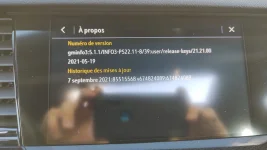
Going in for the software update on Friday. Idk if I'm hallucinating, I could have swore I was on 22.8 but I'm actually on 21.1!! So I'm quite a bit behind
 
Checked I am a PS21.1 as well.. But when I tether it to my phones wifi it checks and says no update.

Anyway to update and not go to the dealer ?
 
Nope. Only the dealer can update it.
 
Updated to 22.11 last Friday, issue still occuring 😡

$180 software update for nothing. Frustrating. Wish I could figure out if this was something wrong with the car or the phone.
 
Last edited:
Back
Top